

Checklist for DMARC Implementation Readiness and Deployment
Your domain sends email every day—transactional receipts, marketing campaigns, internal alerts—and most of them can be spoofed unless you have a checklist for DMARC implementation readiness and deployment in place. Domain-based Message Authentication, Reporting, and Conformance (DMARC) ties together Sender Policy Framework (SPF) and DomainKeys Identified Mail (DKIM) so receiving mail servers can verify that messages actually come from you. This article gives you a hands-on DMARC deployment guide: from auditing your current sending infrastructure, through DNS record configuration, to reaching full enforcement. You will also find an email authentication checklist, a reusable DMARC project plan template, a tools comparison, and the pitfalls that trip up even experienced teams.
Table of Contents
- What Is DMARC?
- How to Deploy DMARC Step by Step
- Best Practices
- Tools Comparison
- Real-World Example (Illustrative Scenario)
- Common Pitfalls in a DMARC Deployment Guide
- FAQ
- Next Steps
- Sources
What Is DMARC?
DMARC is a DNS-published policy that tells receiving mail servers what to do when a message fails SPF or DKIM alignment checks [1]. It builds on two earlier standards: SPF, which lists authorised sending IP addresses for a domain [2], and DKIM, which attaches a cryptographic signature to each message [3].
In practice, this means a receiver looks up your DMARC record, checks whether the message passed SPF or DKIM with a domain that aligns to the header-From address, and then applies the policy you published—none, quarantine, or reject.
Why It Matters for Security Teams
Without DMARC enforcement, an attacker can send mail that appears to originate from your exact domain. CIS Controls v8.1 addresses this directly: Control 9, "Email and Web Browser Protections," calls for hardening email channels against phishing and spoofing [4]. NIST CSF 2.0 maps the concern to PR.DS (Data Security), which covers integrity protections for data in transit [5]. Deploying DMARC is one of the most cost-effective measures a security team can take to reduce phishing surface.
How to Deploy DMARC Step by Step
Prerequisites and Setup
Before touching DNS, gather these items:
| Item | Detail |
|---|---|
| Domain inventory | Every domain and subdomain that sends mail (or should not) |
| SPF audit | Current SPF records for each sending domain; check against the 10-DNS-lookup limit [2] |
| DKIM key pairs | Confirm selectors and key lengths (2 048-bit RSA minimum recommended) for each mail source |
| Aggregate report mailbox | A dedicated mailbox or SaaS endpoint for RUA reports |
| Forensic report mailbox | Optional RUF mailbox for failure samples |
| Stakeholder list | Marketing, IT ops, third-party ESP contacts who send on your behalf |
In practice, this means you cannot publish a meaningful DMARC policy until you know every legitimate source of mail for each domain.
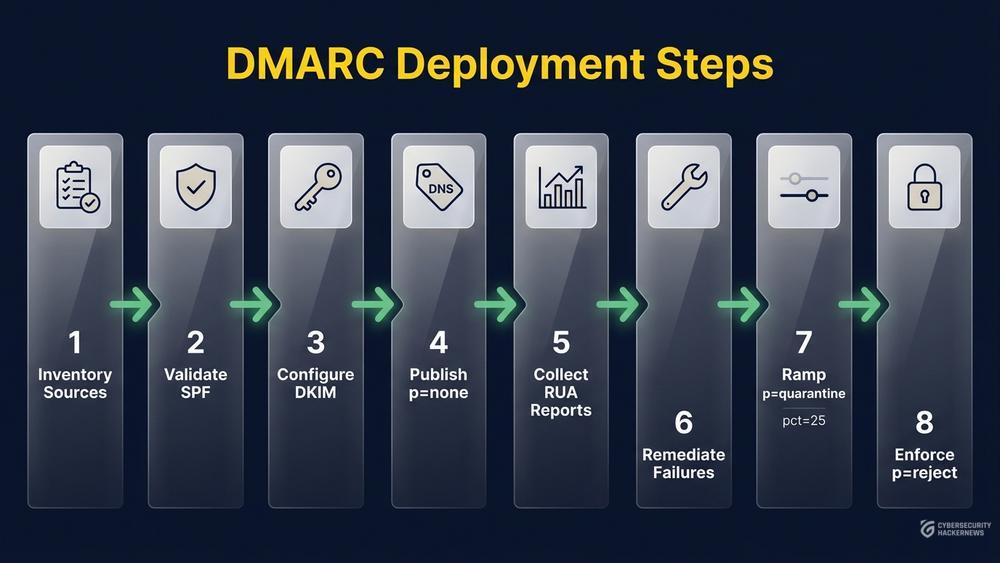
Step 1 — Inventory All Sending Sources
List every system, SaaS platform and third party that sends email using your domain in the header-From. Common sources teams overlook: CRM platforms, ticketing systems, transactional notifications, marketing automation and cloud-hosted monitoring alerts.
Step 2 — Validate SPF Records
RFC 7208 limits SPF evaluation to 10 DNS-querying mechanisms; exceeding this limit results in a permanent error ("permerror") and SPF failure for the entire check [2]. Flatten unnecessary include chains and remove deprecated sending sources. Publish one SPF record per domain—multiple records are invalid.
example.com. IN TXT "v=spf1 include:_spf.google.com include:spf.protection.outlook.com ip4:203.0.113.10 -all"Step 3 — Configure DKIM Signing
Each sending source needs its own DKIM selector. Publish the public key in DNS and enable signing on the mail server or ESP. Verify signatures with a test message to an external mailbox.
Step 4 — Publish a DMARC Record at p=none
Start in monitoring mode. This collects aggregate reports without affecting mail delivery. RFC 7489 specifies that when the sp tag is absent, the p policy applies to subdomains as well [1].
_dmarc.example.com. IN TXT "v=DMARC1; p=none; rua=mailto:dmarc-rua@example.com; ruf=mailto:dmarc-ruf@example.com; fo=1"Step 5 — Collect and Analyse Reports
Collect aggregate (RUA) reports for a minimum of two to four weeks—longer if your sending ecosystem is complex. Parse the XML reports with a DMARC analytics tool (see Tools Comparison) and identify any legitimate sources that fail alignment.
Step 6 — Remediate Failures
Fix every legitimate source that fails SPF or DKIM alignment before tightening policy. Typical fixes: adding an ESP's include to SPF, rotating a broken DKIM selector, or aligning the envelope-From to the header-From.
Step 7 — Move to Quarantine
Once reports show clean alignment for legitimate mail, raise the policy. Use the pct tag to throttle impact during the transition—start at 10-25 % and increase weekly.
_dmarc.example.com. IN TXT "v=DMARC1; p=quarantine; pct=25; rua=mailto:dmarc-rua@example.com; fo=1"Step 8 — Enforce with p=reject
After quarantine shows no legitimate mail being affected, move to full rejection. Remove the pct tag or set it to 100.
_dmarc.example.com. IN TXT "v=DMARC1; p=reject; rua=mailto:dmarc-rua@example.com; fo=1"In practice, this means every unauthenticated message claiming your domain is now discarded by compliant receivers.
Template: DMARC Project Plan Scorecard
Use this fill-in scorecard to track readiness before each policy transition. Score each row 0 (not started), 1 (in progress), or 2 (complete). Transition to the next policy level only when every row scores 2.
| Readiness Gate | p=none → p=quarantine | p=quarantine → p=reject | Score (0/1/2) |
|---|---|---|---|
| All sending sources inventoried | ✔ | ✔ | |
| SPF record under 10 lookups | ✔ | ✔ | |
| DKIM signing active on each source | ✔ | ✔ | |
| RUA reports collected ≥ 2 weeks | ✔ | ✔ | |
| Zero legitimate failures in reports | ✔ | ✔ | |
| Stakeholder sign-off obtained | ✔ | ✔ | |
| pct ramp plan documented | — | ✔ | |
| Rollback procedure tested | ✔ | ✔ |
Adapt the scorecard to your organisation: add rows for regulatory controls, third-party ESP validation, or subdomain-specific policies as needed. Teams with large sending ecosystems often add a "shadow IT scan" row to catch unauthorised sending services.
Best Practices
- Protect parked domains too. Domains that do not send mail should publish
v=DMARC1; p=rejectalong withv=spf1 -alland no DKIM keys. Attackers favour parked domains precisely because they typically lack authentication records. - Use dedicated RUA mailboxes or a SaaS parser. Raw XML reports are difficult to read at scale; a parsing service turns them into actionable dashboards.
- Rotate DKIM keys periodically. Key rotation (for example, every six to twelve months) limits exposure if a private key is compromised.
- Document your rollback procedure. If p=quarantine or p=reject disrupts legitimate mail, you need to revert quickly. Keep a pre-approved DNS change request ready.
- Implement ongoing monitoring after enforcement. DMARC is not a set-and-forget control. New sending sources, ESP migrations, and infrastructure changes can break alignment at any time. Review RUA reports on a recurring schedule—weekly during active change periods, monthly during steady state.
- Align with broader controls. CIS Control 9 (Email and Web Browser Protections) explicitly covers email authentication hardening [4]. Treating DMARC deployment as part of that control family keeps it visible in audit and risk-management workflows.
Tools Comparison
| Tool | Type | Key Capability | Licence |
|---|---|---|---|
| dmarcian | SaaS | RUA/RUF parsing, sender visibility, policy advisor | Commercial |
| Valimail Enforce | SaaS | Automated SPF management, DKIM orchestration | Commercial |
| Agari (Fortra) | SaaS | Brand protection, threat intelligence on abusive senders | Commercial |
| parsedmarc | Open-source | CLI-based RUA/RUF parser, Elasticsearch/Splunk export | Apache 2.0 |
| MxToolbox | Freemium | DNS lookup, SPF/DKIM/DMARC record validation | Freemium |
| Google Postmaster Tools | Free | Domain reputation, delivery errors, authentication stats | Free (Gmail) |
Choose a tool based on your sending volume, number of domains, and whether you need automated remediation or just visibility. Smaller teams often start with parsedmarc plus MxToolbox, then move to a commercial platform as domain count grows.
Real-World Example (Illustrative Scenario)
⚠️ Disclaimer: The following scenario is an illustrative example based on typical industry patterns. The specific metrics are hypothetical estimates designed to demonstrate realistic outcomes, not measured data from a documented project. They should not be cited as factual benchmarks.
Context: A mid-sized financial services firm with 12 domains—three actively sending transactional and marketing email, nine parked.
Challenge: The security team found spoofed emails impersonating the firm's primary domain in phishing campaigns targeting clients. No DMARC record existed, and SPF records on two domains exceeded the 10-lookup limit.
Solution: The team followed a phased DMARC project plan: inventoried all sending sources across business units, consolidated SPF to stay within the lookup limit, enabled DKIM on each ESP, and published p=none. After four weeks of RUA analysis and remediation, they moved to p=quarantine with a pct ramp, and reached p=reject within three months. Parked domains were set to p=reject from day one.
Results (illustrative estimates):
- Spoofed messages impersonating the primary domain dropped by approximately 85 % as observed in RUA reports (illustrative)
- SPF permerror rate fell from an estimated 15 % to 0 % after flattening (illustrative)
- Time from project kick-off to p=reject on all 12 domains was roughly 90 days (illustrative)
- Phishing-related support tickets declined by an estimated 60 % in the quarter following enforcement (illustrative)
Key Takeaways: Start with parked domains for quick wins. Involve marketing and third-party ESPs early—they are typically the last source to achieve DKIM alignment. A documented ramp plan with stakeholder sign-off prevents emergency rollbacks.
Common Pitfalls in a DMARC Deployment Guide
-
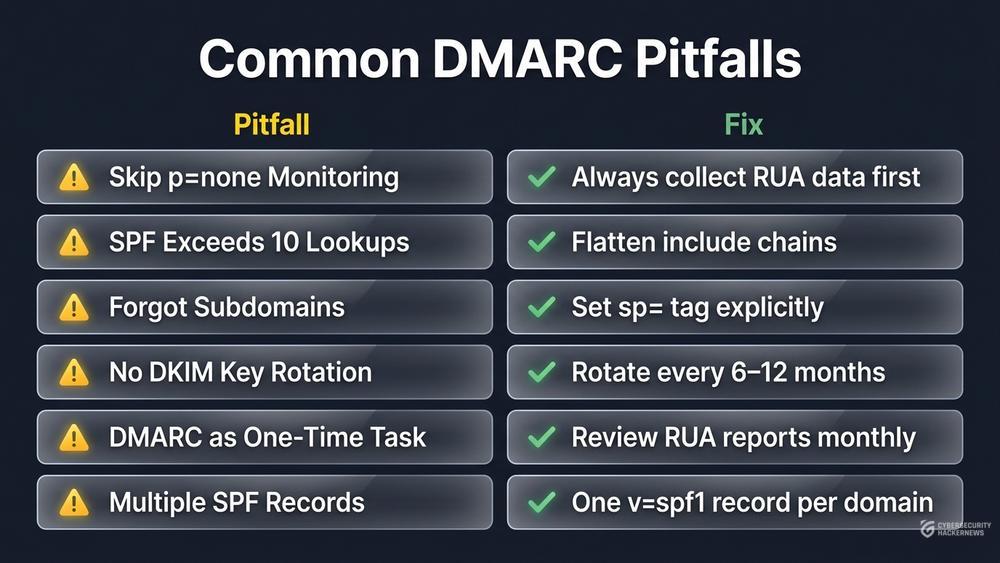
Jumping straight to p=reject. Skipping the monitoring phase almost certainly blocks legitimate mail. Collect RUA data at p=none first and verify alignment before tightening policy.
-
Exceeding the SPF 10-lookup limit. Each
include,a,mx, andredirectmechanism counts toward the limit [2]. Teams that add ESPs without auditing the existing record trigger permerrors, which cause every SPF check for the domain to fail. -
Forgetting subdomains. If you set p=reject on the organisational domain but do not address subdomains, attackers spoof
billing.example.cominstead. Per RFC 7489, ifspis absent theppolicy applies to subdomains [1]—so omittingsp=does not leave subdomains uncovered, but verify your intent explicitly. -
Ignoring DKIM key rotation. A DKIM private key that remains unchanged for years increases exposure. Establish a rotation schedule and verify that old selectors are removed from DNS after the overlap period.
-
Treating DMARC as a one-time project. Infrastructure changes—new ESPs, cloud migrations, acquisitions—regularly introduce unauthenticated mail flows. Without ongoing monitoring of RUA reports, enforcement can silently break legitimate delivery.
-
Publishing multiple SPF records for one domain. The SPF specification allows only one TXT record starting with
v=spf1per domain. A second record makes the entire SPF evaluation invalid, which cascades into DMARC alignment failure.
Next Steps
- Run the scorecard today. Copy the DMARC Project Plan Scorecard from this article and score your primary domain. Any row at 0 is your first action item.
- Publish p=none this week. Even before remediating failures, monitoring mode gives you visibility you did not have before. Point RUA reports at parsedmarc or a SaaS dashboard.
- Schedule a recurring RUA review. Add a calendar item—weekly during rollout, monthly after enforcement—to catch new sending sources that break alignment.
- Extend to parked domains immediately. Every domain you own that is not sending mail should have p=reject,
v=spf1 -all, and no DKIM keys published before you finish reading this article. - Map DMARC to your control framework. If you maintain CIS Controls or NIST CSF 2.0 mappings, link your DMARC deployment to CIS Control 9 [4] and CSF 2.0 PR.DS [5] so it stays visible in audit cycles.
Sources
[1] S. Kitterman, M. Levine, et al., "Domain-based Message Authentication, Reporting, and Conformance (DMARC)," RFC 7489, Internet Engineering Task Force, 2015. [Online]. Available: https://datatracker.ietf.org/doc/html/rfc7489
[2] S. Kitterman, "Sender Policy Framework (SPF) for Authorizing Use of Domains in Email, Version 1," RFC 7208, Internet Engineering Task Force, 2014. [Online]. Available: https://datatracker.ietf.org/doc/html/rfc7208
[3] D. Crocker, T. Hansen, and M. Kucherawy, "DomainKeys Identified Mail (DKIM) Signatures," RFC 6376, Internet Engineering Task Force, 2011. [Online]. Available: https://datatracker.ietf.org/doc/html/rfc6376
[4] Center for Internet Security, "CIS Critical Security Controls Version 8.1," 2024. [Online]. Available: https://www.cisecurity.org/controls/v8-1
[5] NIST, "The NIST Cybersecurity Framework (CSF) 2.0," NIST CSWP 29, National Institute of Standards and Technology, 2024. [Online]. Available: https://csrc.nist.gov/pubs/cswp/29/the-nist-cybersecurity-framework-csf-20/final